This archive report was first published on 6 October 2021.
Published on October 6, 2021, the Oppo Reno6 5G has been a popular choice in the local market, offering a range of innovative features that set it apart from other smartphones. Introduced after the launch of the Reno 5 series, this 5G gadget runs on Android 11 with ColorOS V11.3, with an expected upgrade to Android 12 in the near future.
One of the standout features of the Oppo Reno6 5G is its sleek design, which is sure to catch your attention. But there's more to this smartphone than meets the eye. Let's take a closer look at some of its hidden features that you should be taking advantage of right now.
Smart Sidebar 
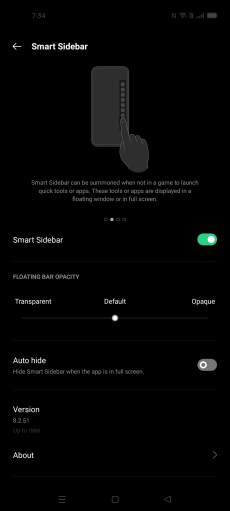
The Smart Sidebar is a convenient feature that allows you to access shortcuts from all angles of your screen. By swiping from the right side edge, you can bring up the Smart Sidebar, which provides access to valuable shortcuts such as screen recording, file management, snapshots, and desired applications.
To access Smart Sidebar settings, follow these steps:
- Go to settings
- Choose Convenience Tools
- Tap on Smart sidebar
RAM Extension 

The Oppo Reno6 5G is one of the few models to be integrated with the RAM expansion feature. This feature takes advantage of the initial smartphone storage and converts it to Virtual RAM, allowing you to expand your RAM from 2GB, 3GB, and 5GB, respectively.
To enable the RAM expansion feature, follow these steps:
- Hover to settings
- Scroll to about phone
- Choose RAM
- Make sure RAM expansion is enabled
- Adjust the slides as you wish and restart your smartphone